It Will Never Be the Year of the Linux Desktop
Why desktop agents give Apple and Microsoft another advantage over Linux.
| Written | Wednesday, May 27, 2026 |
|---|---|
| By | Cyrus Lopez |
| Length | 01590 words, about 8 minutes |
Every year someone says that this is the year of the Linux desktop.
It is never the year of the Linux desktop.
There are plenty of familiar reasons. Someone needs Microsoft Office or Adobe’s applications. Their games don’t work. The battery life is poor, or the laptop won’t wake up after they close the lid. These are reasonable things to care about when choosing a computer, and Linux has spent decades working through them with varying degrees of success.
Now there’s another problem to add to the list. We’re starting to ask AI agents to operate our desktops for us, and the things that make a desktop usable for an agent are not necessarily the things we’ve spent all these years arguing about.
It is about Accessibility.
If you use a Mac, open the Accessibility Inspector that comes with Xcode (you really should try it). It lets you inspect the information an app exposes to assistive software. Behind the windows and buttons you normally look at is a tree of objects describing the interface.
You can find a text field and read its value, or find a button and ask which actions it supports. Controls can expose their position and whether they’re enabled. In some cases you can invoke an action directly, without moving the mouse over the control at all.
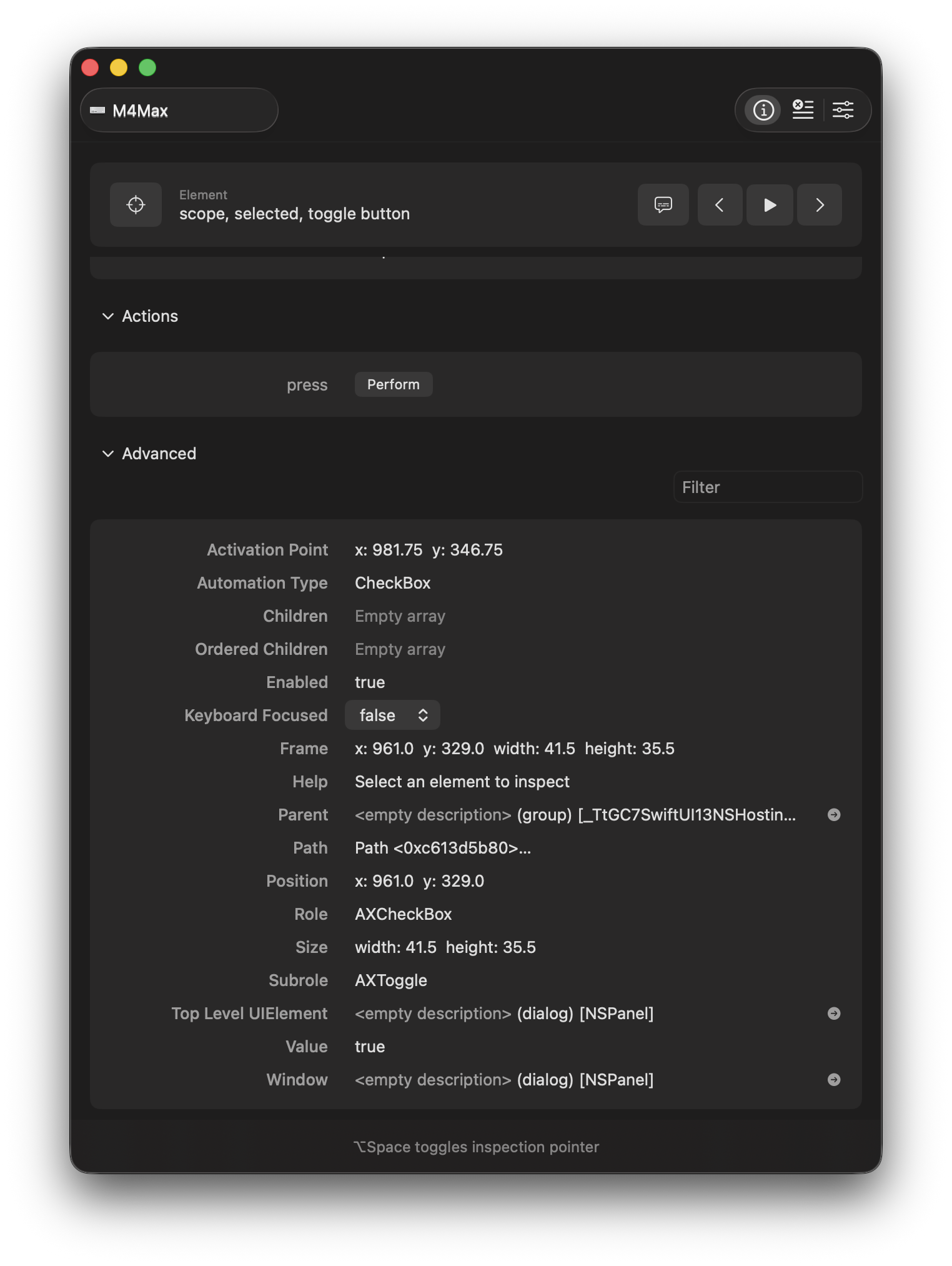
This information is how tools like VoiceOver let someone use an application without having to see the screen. A screen reader needs to know that a control is a button, what it’s called, and what state it’s in. The application has to expose enough information for someone to understand and operate it.
It turns out that all of this is extremely useful to an agent as well. A model can work from a screenshot, but having the app identify its controls saves it from having to infer everything from pixels. It can also get information that isn’t visible in the screenshot.
OpenAI’s Codex Computer Use is currently the best example. On macOS it can read text exposed by an app as well as take screenshots. Depending on the app, that can include text outside the visible scroll area. It can also operate apps in the background while you keep using the computer. That’s such a ridiculously better experience than having to sit and watch an agent take over your mouse.
OpenAI acquired Software Applications Incorporated in October 2025. The company had been building Sky, an assistant that could use Mac applications on your behalf. You can still see the name in Codex’s SkyComputerUseClient binary. The team had spent its time figuring out how to make this work on the Mac and then OpenAI bought that work.
Windows and Linux both have accessibility APIs, of course. APIs are easy to have. You write them down in a header file, give a conference talk about them, and then spend the next twenty years explaining why nobody used them correctly.
I think a large part of the Mac’s advantage comes from its defaults.
If you build a Mac app with standard AppKit controls such as NSButton and NSTextField, much of the accessibility support is already there. The controls know what they are and how to expose their behavior. Developers still need to provide meaningful labels and handle custom interfaces properly, but using the stock controls gets them a substantial part of the way there.
That matters because it makes accessibility less dependent on someone remembering to add it at the end of a project. Apple did some of the work in the framework, so applications built with it inherit the benefit. Agents can use that same information now.
Plenty of engineering teams have treated accessibility as a compliance requirement or something to fix later, if there’s time. There rarely is. The unlabeled button ships, a disabled user can’t use it, and the issue sits in a backlog.
That’s a lousy way to build software. I suspect some of those issues will suddenly get more attention when they also prevent a paying customer’s agent from completing a task. An agent trying to book a flight has a practical use for the same labels and actions that should have been available to assistive software all along.
Windows has a capable system for this too. Microsoft UI Automation (UIA) exposes a tree with three filtered views: raw, control, and content. Its control patterns describe what you can do with an element. InvokePattern lets you activate a button, TextPattern gives you access to document text, and ValuePattern lets you work with an input’s value.
Microsoft’s own documentation describes UIA as useful for both assistive technology and automated testing. Using it to let another program operate the interface was part of the design. UI Automation is, by any reasonable engineering standard, excellent.
The problem with Windows is not the API. The problem is archaeology. Every Windows machine is a museum of electricity. There’s not one type of app. There is Win32. There is WPF. There is WinForms. There is UWP. There is WinUI. There is Electron. There is some custom line-of-business application written by a contractor in 2009 who has since moved to a farm and cannot be reached. There is a settings panel that is secretly a web page. There is a desktop app that is secretly Chromium wearing a fake mustache. The list goes on.
For an agent moving between applications, that inconsistency matters. A table needs to expose enough of its structure and contents to be useful. If it appears as a collection of unnamed objects, the agent has to find another way to work out what’s there. Mac apps can get this wrong too. Having good framework support only helps when the application makes use of it.
Linux has its own version of this problem, with some additional complications.
Its accessibility stack is called AT-SPI, the Assistive Technology Service Provider Interface. It runs over D-Bus and exposes interfaces for things like text, values, and actions. GTK and Qt applications can use it, as do applications such as Firefox and LibreOffice. It’s the infrastructure used by Orca, the GNOME screen reader. Linux has had people doing this work for a long time.
An agent also needs to find windows, capture their contents, and send input. The user needs a reasonable way to grant and revoke access. Ideally, all of this works without making the computer difficult to use while the agent is working.
On a Mac, the system permissions for Codex’s computer use are Accessibility and Screen Recording, both in System Settings. Under Wayland, a Linux agent can use the ScreenCast and RemoteDesktop portals for screen access and input, with libei providing an input mechanism on supported systems. These are real efforts to standardize the work. The portal backend still depends on the desktop environment, and access to window information varies with the compositor.
The result is more integration work for anyone trying to support Linux as a whole. Getting an agent to work in one desktop session tells you something useful. It doesn’t tell you whether the same setup will work for someone using a different compositor and a different set of applications.
Newton, the effort to build a new Wayland-native accessibility stack, is a good example of how much coordination this takes. Matt Campbell developed it with funding from the Sovereign Tech Fund. An April 2025 report on the GNOME STF project described useful work already reaching GTK, while noting that the proposed protocol still needed formal definition and cross-desktop discussion. At that point, getting a prototype working was only part of the job. Other toolkits and compositors would also have to adopt it.
This is where I think Linux is at a disadvantage. Apple can make a decision about its frameworks and ship the result with the operating system. Microsoft has a large compatibility problem, but it can fund work across its platform and maintain a common set of interfaces. On Linux, a change can require agreement and implementation across several independent projects, each with its own priorities and maintainers who are already busy.
Individual developers and grants can get important work started. Keeping it working across applications and desktop environments, through years of releases, takes sustained funding and attention. I don’t think the people doing this work get nearly enough of either.
The frustrating part is that Linux has become a perfectly usable desktop for a lot of people. You can put Ubuntu on a ThinkPad and do most of what you need to do. People do. A great deal of difficult work went into making that possible.
Now we’re adding another expectation: that an assistant can use those same applications reliably on our behalf. If that becomes an ordinary part of using a computer, people will expect it to work when they buy one. They won’t care whether a failure belongs to the app, its toolkit, or the compositor.
I expect Apple and Microsoft to have a much easier time delivering that as part of a desktop people can just buy and use. Linux can demonstrate all of the individual pieces and still leave the person building an agent with considerably more work to do.
Closing that gap means paying people to test actual applications, fix incomplete accessibility support, and keep the whole thing working after an update. It also means getting the fixes adopted across projects that nobody can simply order to do the work. I don’t see how we get there at the scale required, and I don’t expect users to wait while we figure it out.